
Background
ERP system should meet minimum compliance requirements. So, the audit job is carried out by various parties like internal auditors and external auditors.
Internal Auditors: They are your organization’s group of people who ensure the procedures are in place and everyone follows what is written on the paper.
External Auditors: They are hired by your organization (KPMG, Deloitte, EY, PwC, or others) or a team from the parent company.
Their job is to ensure that the ERP system is compliant which means the system follows the rules from various regulations in financials and security.
Segregation
One such activity is to separate the duties in the organizations. Example: Procurement officers should not create any payments to avoid potential fraud in the company. And the list goes on.
Problem
The issue is who will define these roles? auditors just need reports and at the same time company is clueless about defining the segmentation. So the good consultant or admin in the company should come with some roles which could be the issue. Yes, there are good companies who help each other because, in the top management, they are experienced in audit-related work.
Setup: Step 1
In Dynamics 365 Finance and Operations we can define the duty segregations. If a conflict occurs between duties then a list of users is displayed. Then admin should take action like removing the access or grant because they should have access even if there is a conflict. Example: Purchase requisition creator should not create Purchase orders however exception is applied to the purchase agent.
Navigate to System Administration -> Security -> Segregation of Duties -> Segregation of Duties rules.
Name: 01-PO Creation and Payments ( Use logical rule name and I suggest prefixing with number)
First Duty: Select the primary duty (If you have custom duties please keep simple and logical names):
Second Duty: The second duty will compare with first duty (see below process and result)
Severity: Select anyone
Security Risk: Define logical risk that what will happen if a conflict occurs
Security Mitigation: Define the action that will happen if there is a conflict and a possible exception may be provided to the specific user.

Step 2
Run the process “Verify compliance of user-role assignments with rules for segregation of duties”
This will generate the list of users in the conflict which will be listed under the menu Segregation of duties conflicts. Identify which user can be removed or allowed access but specify the reason.
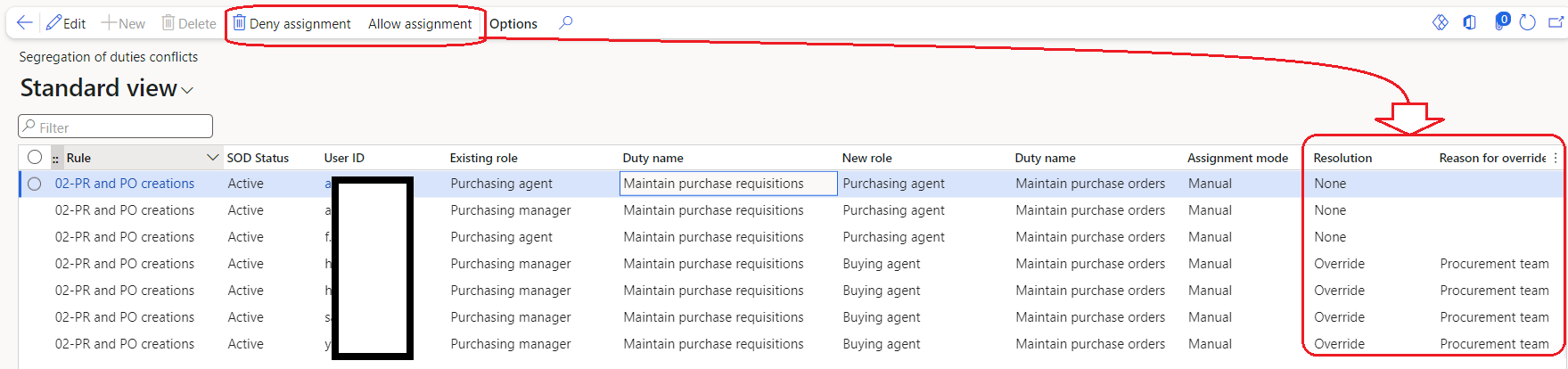
After resolving the conflicts you can see the list of the un-resolved list under “Segregation of duties unresolved conflicts“
 Dynamics 365 Finance and Operations